A company’s visibility online matters more and more to building a successful business. One of the most effective ways to raise your profile and attract more local customers is a Google Business Profile. It is a free tool letting businesses manage their presence in Google search and Google Maps, presenting important information such as opening hours, contact details and reviews. A properly optimised Google Business Profile can become an essential competitive advantage, attracting more customers and making your business more credible. In this article we want to discuss in a little more depth how to set up and optimise your Google Business Profile properly, for the greatest possible benefit.
What is a Google Business Profile?
Google Business Profile (formerly Google My Business) is a free tool that helps businesses manage their presence in Google search and Google Maps. It lets a company create a business profile carrying the essentials: address, contact details, opening hours, website and more. Customers can also leave reviews, look at photographs, ask questions and even book services directly through the profile.
Why does a Google Business Profile matter to a business?
A Google Business Profile is an important tool for any business looking to improve its visibility and credibility online. That matters particularly to local businesses, which need to attract customers from their own area. A Google Business Profile helps a business appear higher in Google search results and in Maps, so people find the company more easily when looking for products or services nearby.
One of the principal advantages of a Google Business Profile is the direct connection with customers. Through the profile you can present the business information that matters to prospects — opening hours, contact details, address and a link to your website. Your customers can leave reviews there and read other people’s. That creates transparency and makes a business more accessible, because people can get information about services and products directly.
A Google Business Profile also helps strengthen a company’s credibility. People are more inclined to trust companies visible on Google platforms with a well-maintained profile. High ratings and positive reviews can substantially increase new customers’ confidence and their decision to use a company’s services. A business can also respond directly to reviews, which not only improves the relationship with existing customers but shows prospects that the company values their opinion.
A Google Business Profile also makes a company more visible in local search. That matters particularly to small and medium-sized companies whose customer base is often limited to a defined area. An optimised profile raises the likelihood that your business appears higher in Google’s results when people search for local services or products. That greater visibility helps attract more customers without additional advertising spend.
And of course, using a Google Business Profile gives you genuinely valuable business data that helps with growth. Google offers tools for monitoring how people interact with your profile, which search terms they use and what actions they take. That information helps you understand customer behaviour better and adapt your business strategy to make it more effective.
How do you set up a Google Business Profile? Step by step
Setting up a Google Business Profile is a straightforward process, and here we share how to do it quickly and simply.
1. Sign in to your Google account
The first step is signing in to the Google account you want to use to manage the business profile. If you do not have one yet, you can easily create it here. It matters to use the official account, because that is what you will manage all your business information through.
2. Go to the Google Business Profile site
Once signed in to your Google account, go to the official site at business.google.com. Select “Get started” and move on to creating the business profile.
3. Enter your company name
The first step is entering your company name. If your company is already registered in Google’s systems, you will be able to choose it from a list. If not, carry on and enter your business name.
4. Choose a business category
It matters to choose the right category, because that helps Google understand what you do and present your business to people searching for particular services or products. Categories can be things like “Restaurant”, “Hairdresser”, “Legal services” and so on.
5. Specify your location
If your business has a physical location customers can visit, select “Yes” and enter your address. That will make sure your business is visible in Google Maps. If you provide services not tied to a particular physical location, you can select “No” and specify the area you serve.
6. Add your contact information
Enter your company’s telephone number and website address, if you have one. This information will be visible on your profile and will help customers get in touch more easily.
7. Complete registration and choose a verification method
Once all the business information is filled in, Google will ask you to verify your business. You can do that in several ways:
- By post – the most common method. Google sends you a card with a verification code to enter into the system.
- By email or telephone – in some cases a business can be verified by email or by phone.
- Instant verification – if you already use Google Search Console for your site, you may be able to verify the business immediately.
8. Add further information
After verification you will be able to add further information about your company, upload photographs and a description, set your opening hours and include other important details that will help attract customers.
Looking to optimise your Google Business Profile properly? We can help. Book a free consultation.
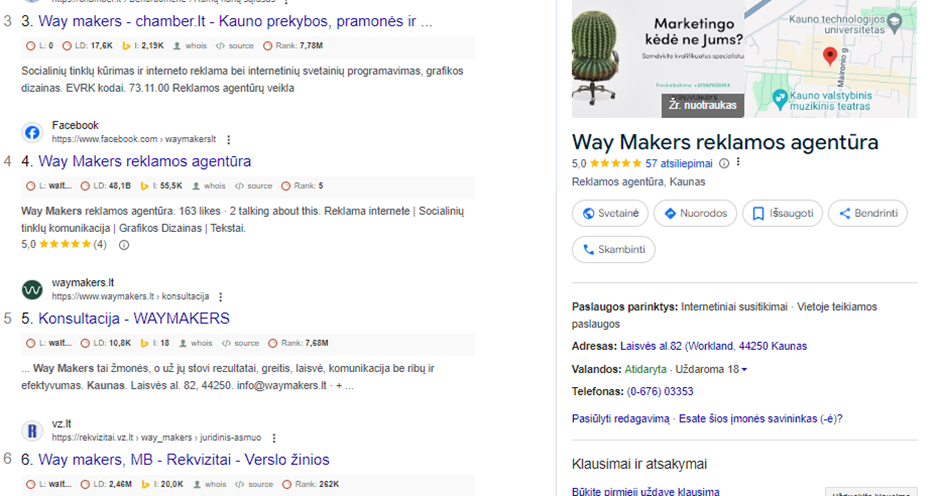
How do you add a company to Google Maps?
- Once you have signed up to Google Business Profile and completed registration, your company is automatically added to Google Maps.
- If the company already exists but is not visible on the map, go to Google Maps, search for the company and select “Add your business”.
- Once you have verified your company’s location, it will appear in Google Maps and in Google search itself.
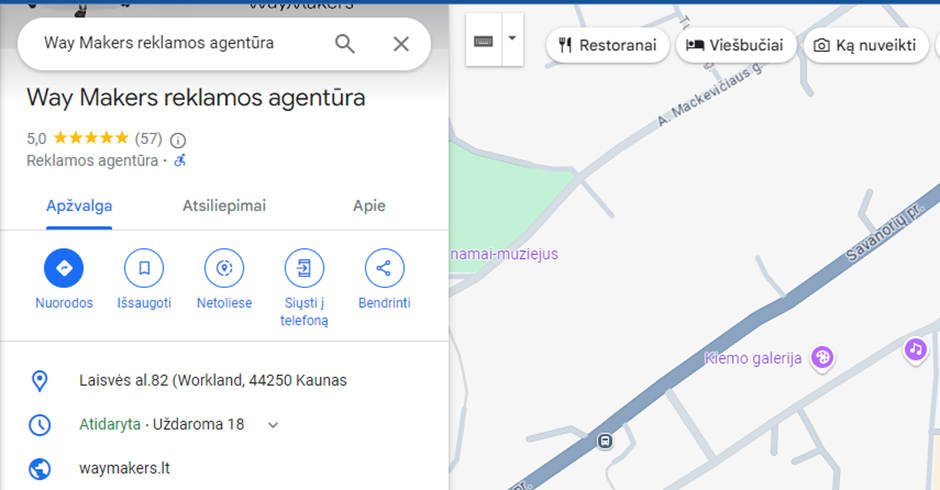
How do you optimise a Google Business Profile?
Optimising a Google Business Profile is an essential step towards greater visibility, better engagement and successful local marketing. Below are the main ways to optimise it.
1. Fill in all your business information
It matters that your profile is completely filled in with all the relevant details.
Business name – use the exact, official company name without additional keywords.
Address and contact details – make sure the address, telephone number and website link are accurate.
Opening hours – include your opening hours and update them whenever they change.
Business description – write a short, informative description including the main keywords that describe what you do.
A fully completed profile raises the likelihood that your business appears higher in Google’s results.
2. Add good photographs
Photographs are an important part of optimising a Google Business Profile. Good photography increases engagement and helps create a positive impression. Upload:
- A photograph of the building – so customers can easily recognise where you are.
- Interior photographs – show the quality of your services or products.
- Photographs of products or services – so prospects can get to know what you offer.
- Update the photographs regularly, so the profile stays current.
3. Managing reviews
Reviews matter enormously, because they strongly influence prospects’ decisions. A well-optimised profile should carry plenty of positive reviews. Encourage your customers to leave them, for example:
- By asking after you have provided the service.
- By sharing a review link by email or on social media.
It also matters to respond to every review, positive and negative alike. Courteous replies show that you value your customers’ opinions and are ready to resolve problems.
4. Use posts and updates
Google Business Profile lets you update information regularly through posts. You can share:
- News about products or services.
- Promotions and special offers.
- Company events.
Posts help hold interest and show that your business is active. They also have a positive effect on search rankings.
5. Optimise with keywords
To increase visibility, include suitable keywords in your business description, your posts and even your replies to reviews — the ones that best describe your business and services. Keywords should be natural and genuinely connected to what you offer.
6. Make use of Google’s questions and answers
Be active in answering these questions, so customers get the information they need. You can also add frequently asked questions with answers, to make the profile more complete still.
7. Watch the analytics
Google Business Profile offers thorough statistics letting you monitor how people interact with your profile. Watch:
- How many people saw your profile.
- What actions they took: calling, visiting the website or following links.
- Where they found you: through Google Maps or through search.
This data helps you understand behaviour better and adapt your optimisation strategy accordingly.
An optimised Google Business Profile can substantially increase your visibility in the local market and secure better engagement.
How do you tell a well-optimised Google Business Profile from a poor one?
- A well-optimised Google Business Profile has complete information, is actively updated, carries plenty of positive and well-managed reviews, high-quality photography and a clear description enriched with keywords.
- A poorly optimised Google Business Profile may have incomplete details, outdated or inaccurate business information, few or inactive reviews, and poor photography or none at all.
Looking to optimise your Google Business Profile properly? We can help. Book a free consultation.
What do you do if your Google Business Profile is suspended?
If your Google Business Profile has been suspended, take these steps:
- Check for violations: review whether your profile breached Google’s guidelines (misleading information, unlawful activity and so on).
- Contact Google: use the Google Business Profile help centre or fill in the relevant form to explain the situation and try to have the profile reinstated.
- Update your information: if the problem arose from inaccurate information, correct it and try verifying the business again.
The most common mistakes when optimising a Google Business Profile
When optimising a Google Business Profile it matters not only to follow best practice but to avoid the most common mistakes. A properly optimised profile helps a business show up better in local search and attract more customers, but a poorly managed one can have the opposite effect. Here are the main mistakes to avoid:
1. Incomplete business information
One of the most common shortcomings is a profile that is not fully completed. Where essential details are missing — opening hours, contact details, address — people cannot get the information they need, and Google may not treat the profile as dependable. That reduces the chances of appearing higher in the results and loses you prospects.
2. Wrong or outdated details
Outdated opening hours, a wrong address or an inactive telephone number cause confusion. People can lose confidence in a company if they cannot get in touch or visit the location given. So it is essential to update all your information regularly, particularly when your hours, location or services change.
3. Not replying to reviews
Ignoring customer reviews is a serious mistake. Both positive and negative reviews should be answered courteously and professionally. That shows you value your customers’ opinions and are ready to resolve problems. Leaving negative reviews unanswered can lose you trust, which affects your reputation.
4. Poor photographs, or too few
Profile photography is one of the most important parts of optimisation. Uploading poor or unprofessional photographs is a mistake, because they shape a customer’s first impression. A profile with few photographs, or none, can look untrustworthy and out of date. People often choose businesses that present plenty of good visual material.
5. Over-optimising with keywords
Although using keywords in a business description is an important part of optimisation, using too many is a mistake. Google’s algorithms recognise when keywords are used too often and unnaturally, and such content can be rated poorly. Keywords should be worked in naturally, so the description reads smoothly and informatively.
6. Not using posts and updates
Some businesses forget the opportunity to share news, promotions and events through Google Business Profile posts. A profile that is not active enough can look neglected, and people may assume the business has closed. A continuously updated profile helps hold interest and makes sure people get the latest information.
7. Imprecise categories and services
The wrong business category, or leaving out particular services you provide, reduces the chance that people find your business through local search. It is essential to specify your main category precisely and add every other relevant service you offer. The more precise the information, the more easily prospects will find you.
8. Disregarding the profile analytics
Google Business Profile provides valuable analytics that many companies disregard. This data helps you understand how customers interact with your profile and which keywords they use to find your business. Without analysing it you lose the chance to understand your customers better and improve your visibility.
Conclusions
A Google Business Profile is a powerful tool helping businesses become more visible in their local market. It is a free platform letting companies manage their information in Google search and Maps, making sure prospects easily find what they need to know about the services or products on offer. A properly built and optimised profile can substantially increase customer flow, improve a business’s reputation and help build a stronger connection with an audience.
To get the best performance from a Google Business Profile, a few essential things matter: filling in all your business information, updating opening hours and contact details regularly, and adding good photographs. It is also essential to manage reviews actively, answer customers’ questions and involve them in your news and promotions through posts. These steps make sure your profile is not only easy to find but leaves a positive impression of your business.
Most importantly, optimising a Google Business Profile means avoiding the mistakes that reduce your visibility and your customers’ confidence. An incomplete profile, outdated or incorrect information, poor visual material or negative reviews left unanswered can do real damage to your image. So it is essential to keep monitoring and improving the profile, taking account of how people behave and what the business needs.
Overall, optimising a Google Business Profile is a continuous process that takes attention and maintenance, but the results are worth the effort. Used properly, the platform can not only raise your company’s visibility online but strengthen your relationship with local customers, improve your reputation and, over time, deliver sustainable growth.
Looking to optimise your Google Business Profile properly? We can help. Book a free consultation.

